Dynamic macros enable one link to support thousands of destinations
TL;DR Summary (click to expand)
Maintaining unique deep links for every product or piece of content in your app is operationally unsustainable at scale. Dynamic macro replacement solves this by using a single deep link template with placeholder macros (e.g., {product_id}). These macros dynamically resolve to specific destinations at the moment of the click, letting one tracking link serve infinite products or content items across any app vertical, significantly reducing operational overhead. By adopting such a streamlined approach, app marketers can effectively scale campaigns while minimizing manual link management.
If you’re managing a growing volume of deep links or planning to launch dynamic product ads and personalized content campaigns, dynamic macro replacement offers scalable, efficient link management. Contact support@kochava.com to explore and implement dynamic deep linking best practices.
If you manage marketing for an app with more than a handful of products, content titles, or offers, you may find yourself considering a daunting question: Do I need a unique deep link for every single product or combination of content inside my app?
An ecommerce app with 10,000 SKUs. A streaming platform with tens of thousands of shows and movies. A music app with a collection too large to count. Picture this question multiplied across a catalog that size, and the idea of building and maintaining thousands of individual links quickly feels overwhelming.
Thankfully, that isn’t your only option, and you shouldn’t simply have to accept it as operational reality. The key to solving exactly this kind of scale problem? Dynamic macro replacement.
The Limitations of Static Deep Linking
Static deep linking works exactly as the name suggests:
one deep link = one fixed destination
You build a link that sends users to a specific product page, specific episode, specific article. It works fine when you have only a small number of destinations to manage. It breaks down fast when you don’t.
Imagine a marketing team running dynamic product ads across a catalog of thousands of items. Under a static linking approach, this means building and maintaining a one-to-one relationship between every product and its own dedicated tracking link. Each new product added to the catalog means a new link. Every campaign refresh means auditing which links point where. The operational overhead compounds with the size of the catalog and, for teams operating at scale, becomes genuinely unmanageable.
The Solution: One Template, Infinite Destinations
Dynamic macro replacement flips the entire model. Instead of building a separate link for every destination, you build a single deep link template with a placeholder macro embedded in the structure. The macro gets replaced dynamically with the correct value at the moment a user clicks, sending them to the precise destination tied to the context of the ad they engaged with.
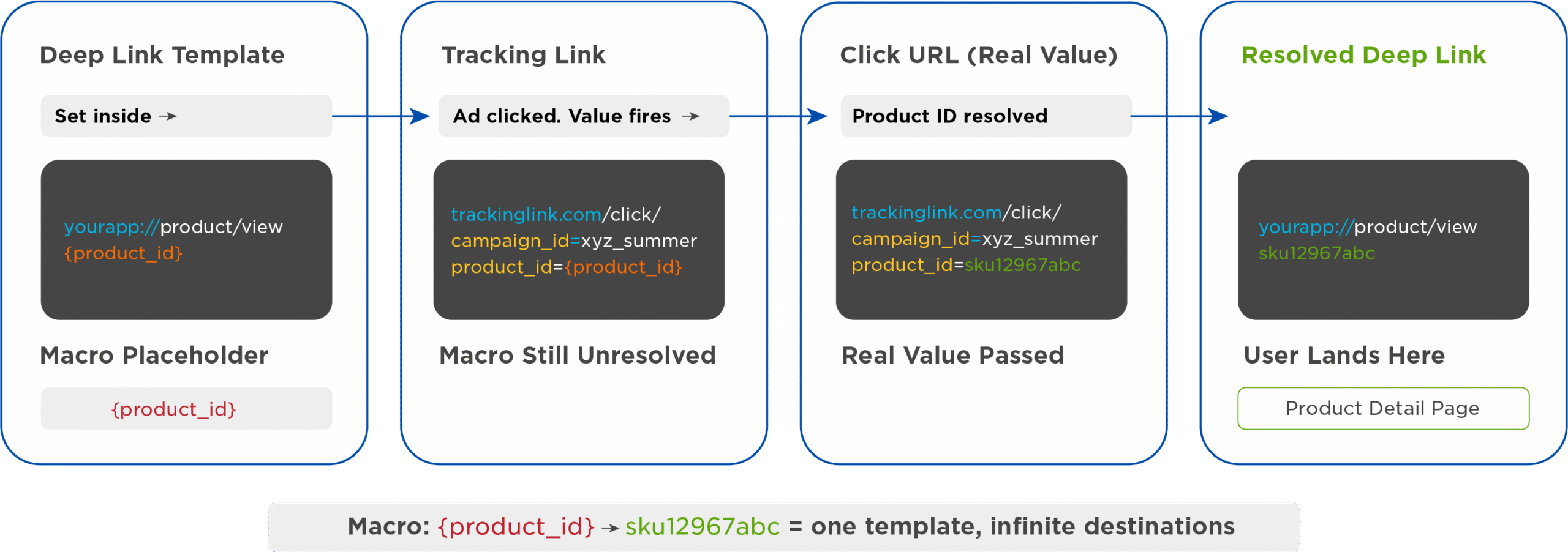
Here’s how the flow works:
1. Deep link destination template
You start with a deep link template that includes a macro placeholder instead of a fixed value:
yourapp://product/view/{product_id}
The {product_id} in curly brackets is not a real value, but a placeholder waiting to be filled in.
2. Tracking link
Your tracking link (the URL that appears in your ad, email, or campaign) carries the same macro through its query string:
trackinglink.com/click/?campaign_id=xyz_summer&product_id={product_id}
At this stage, nothing has been resolved yet. The macro still sits there as a placeholder inside the tracking link itself.
3. The real value gets passed at click time
When the ad actually serves, whether it’s a dynamic product ad, a personalized content recommendation, or any other ad unit tied to a specific catalog item, the ad network or ad server serving the ad—the same system through which the click’s routing passes—fills in the real value in place of the macro. For example:
trackinglink.com/click/?campaign_id=xyz_summer&product_id=sku12967abc
4. Kochava resolves the destination
As Kochava processes the click, it dynamically appends the real value into the deep link destination associated with the tracker, replacing the macro with the actual product ID:
yourapp://product/view/sku12967abc
The user lands exactly where they should, on the specific product page tied to the ad they clicked, without your team ever having to build a link specifically for that SKU.
Watch James Benoit, Sr. Director of Sales Engineering at Kochava, unpack dynamic macro replacement.
Want to learn all about deep linking?
Watch the full Deep Linking 101 webinar.
Dynamic Deep Linking Is Not Just for Ecommerce
While ecommerce product IDs are the easiest example to visualize, the same mechanism applies to any app with a large, dynamic set of destinations, whether hundreds of product pages, thousands of articles, or any other high-volume set of places a user could potentially land inside the app.
A media and entertainment app can leverage this pattern with a show_id or episode_id macro. A news or publishing app can use an article_id. A music streaming platform can resolve to a specific track_id or album_id. The structure of the macro changes to fit the content type, but the underlying mechanism, a single link resolving dynamically to any number of destinations, stays the same.
And critically, a single link isn’t limited to just one macro. Multiple macro parameters can be combined within the same deep link template. For example, an offer ID alongside a product ID, allowing a single tracking link to resolve based on a combination of variables. This supports even more sophisticated targeting and personalization without adding any additional operational complexity.
Here’s a quick look at how the same core pattern plays out across different app categories:
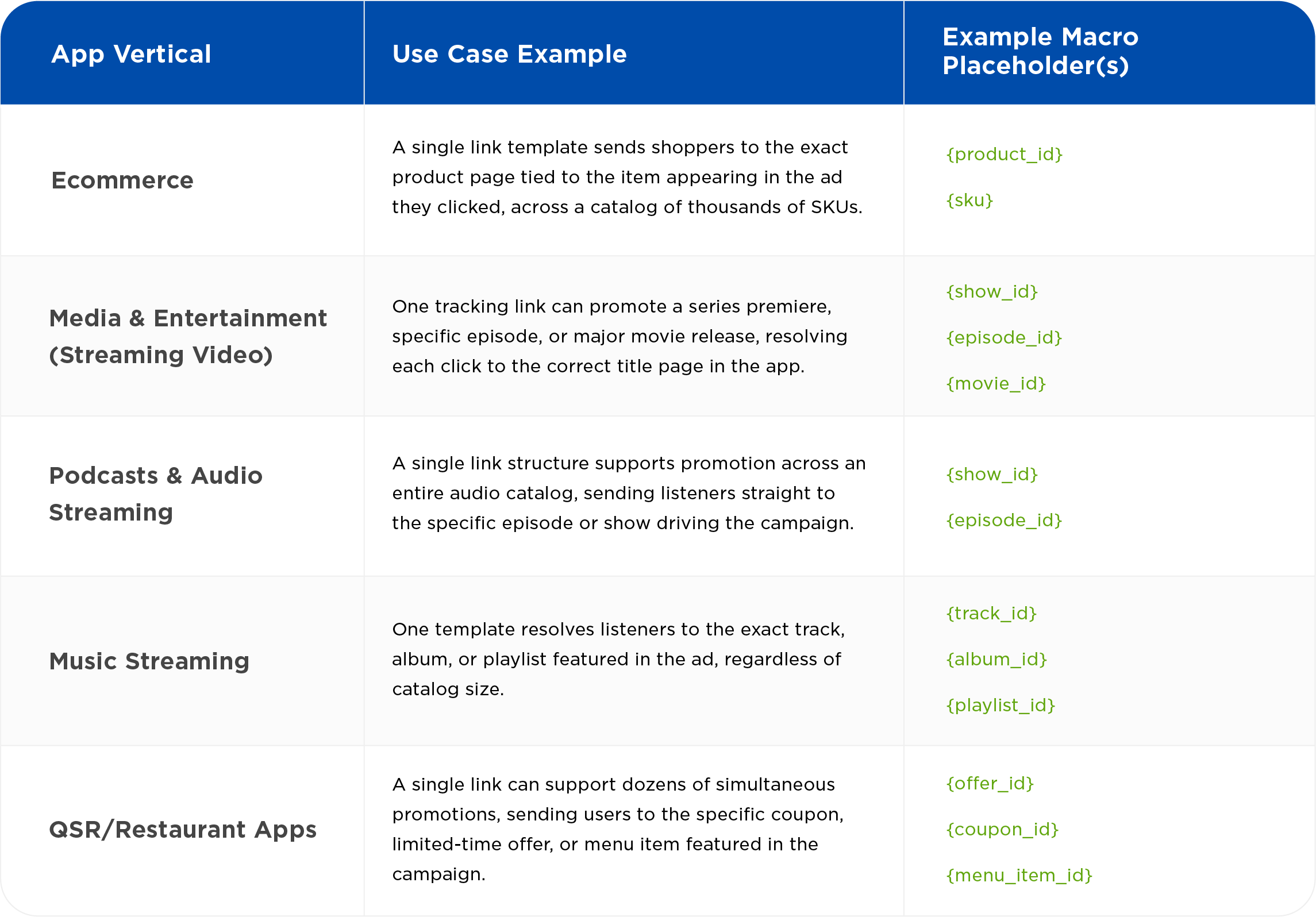
In every case, the pattern is identical: a deep link template, tracking link, and macro (or combination of macros) that resolve to the correct destination the moment a user clicks.
Getting Started With Dynamic Macro Replacement
Without dynamic macro replacement, scaling a campaign to cover a full product catalog or content library means scaling your link management workload right alongside it. With dynamic macro replacement, the workload stays flat regardless of catalog size.
If your team manages a large or growing number of individual deep links, or you’re looking to launch dynamic product ads or personalized content campaigns and want your links to scale with you, dynamic macro replacement is worth exploring.
To see how this approach can be configured directly within your Kochava account or to talk through how macro-based deep linking could apply to your specific app and catalog structure, reach out to your Client Success Manager or contact support@kochava.com.
Not yet a Kochava customer, but interested in scaling your deep linking strategy? Contact us.
Dynamic Deep Linking FAQ
What is a macro in deep linking, and how does dynamic macro replacement work?
A macro in deep linking is a placeholder, such as {product_id} or {episode_id}, embedded inside a deep link template in place of a fixed value. Dynamic macro replacement is the process of resolving the placeholder into the correct real value at the moment a user clicks, allowing a single deep link template to route to any number of destinations inside an app without requiring a separate link for each one.
How do you create a deep link for a large product catalog without building thousands of individual links?
Instead of building a unique deep link for every SKU, episode, or piece of content, you build one deep link template containing a macro placeholder. This single template, paired with a tracking link carrying the same macro, can dynamically resolve to any destination in your catalog, whether it holds 50 items or 50,000, so link volume no longer scales with catalog size.
Where does the macro get replaced with the real value in a tracking link?
The macro is filled in with its real value at click time by the ad network or ad server serving the ad, the same system through which the click’s routing passes. The real value is then passed along in the tracking link before Kochava processes the click and resolves it into the final deep link destination.
Is dynamic macro replacement useful only for ecommerce apps?
No. While ecommerce product IDs are the easiest example to visualize, the same macro-based approach applies to any app with a large or frequently changing set of destinations, including media and entertainment apps (show_id, episode_id), music streaming platforms (track_id, album_id), podcast and audio apps, and QSR or restaurant apps managing multiple simultaneous offers.