Time to switch mobile measurement partners? Here’s how to streamline your MMP migration
TL;DR Summary
Switching your mobile measurement partner (MMP) is a coherent six-step process with Kochava, typically completed in 7 to 10 business days. This post outlines the path from initial planning and SDK integration (which can take as little as 10 minutes) to a controlled go-live. AI accelerates the heavy lifting by automating tasks like bulk tracking link generation and attribution setting audits between your prior MMP and Kochava. By migrating to Kochava, app marketers establish a reliable attribution foundation while gaining a unified platform for last-touch attribution, marketing mix modeling (MMM), and self-serve incrementality testing, future-proofing their measurement framework. View our comprehensive MMP migration guide or contact Kochava to start planning your own migration.
Let’s be honest: If you’re reading this, something isn’t working.
Maybe your current mobile measurement partner (MMP) has reporting gaps. Maybe support has gone quiet. Maybe the invoice doesn’t match what you signed up for and explanations on why your costs have skyrocketed don’t make any sense. Whatever brought you here, you’ve probably asked yourself, “Is switching MMPs actually worth it?”
Here’s a better question: What’s it costing you to stay?
Switching your MMP is a real decision, but it’s not the operational nightmare your imagination might conjure up. Over the years, as one of the very first MMPs (founded in 2011), Kochava has helped countless app marketing teams switch from other MMPs. AI innovations have made the MMP migration process even easier. Some of the heaviest lifting involved in migration can be automated and accelerated using StationOne™, Kochava’s integrative AI platform.
Think:
- Bulk generation of tracking links for paid and owned media campaigns
- Automated audits of attribution settings to ensure parity between your old MMP and Kochava
- Partner configuration cross-checks
- Ongoing data monitoring across your full app portfolio
All of these can now be driven by AI rather than manual effort.
Running a large-scale implementation or managing a broad portfolio of apps?
Reach out to us. We have dedicated change management support for scaled organizations—and our Client Onboarding Team has seen it all. We’ll help you scope what’s involved and build a plan to make the transition manageable, no matter how complex your setup.
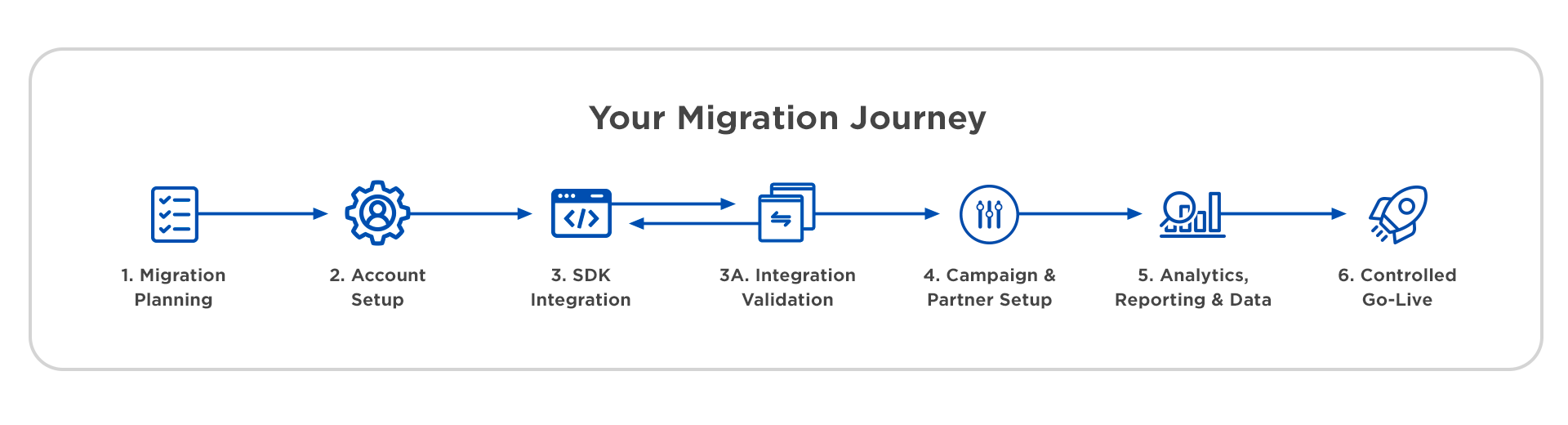
The 6-Step MMP Migration
Here’s an overview of how the MMP migration process works at Kochava from start to finish.
Step 1: Migration Planning
Before any technical work begins, your dedicated Kochava Client Onboarding Manager sits with you to map out the migration. You’ll set a go-live target, inventory your apps and platforms, and walk away with a clear milestone schedule. Most migrations take 7 to 10 business days from kickoff to live.
Step 2: Account Setup
Your Client Onboarding Manager sets up your account and team access. Your job is to create an App Profile in your new account for each app and platform you’re migrating. These become the destination for all your installs, events, and session data once you go live.
Step 3: SDK Integration
Your developers integrate the Kochava software development kit (SDK) into each app. A basic install-only integration takes as little as 10 minutes. If you want to track post-install events and implement advanced features, plan for a bit more time—knowing that the measurement depth you will gain is well worth it.
Prefer not to use a third-party SDK? Kochava supports server-to-server (S2S) integration as well. Ask our team about details.
Step 3A: Integration Validation
Before anything goes near production, you’ll verify that installs and events are firing correctly using a separate DEV app profile. A few minutes here prevents data gaps and misattribution once you’re live.
Step 4: Campaign & Partner Setup
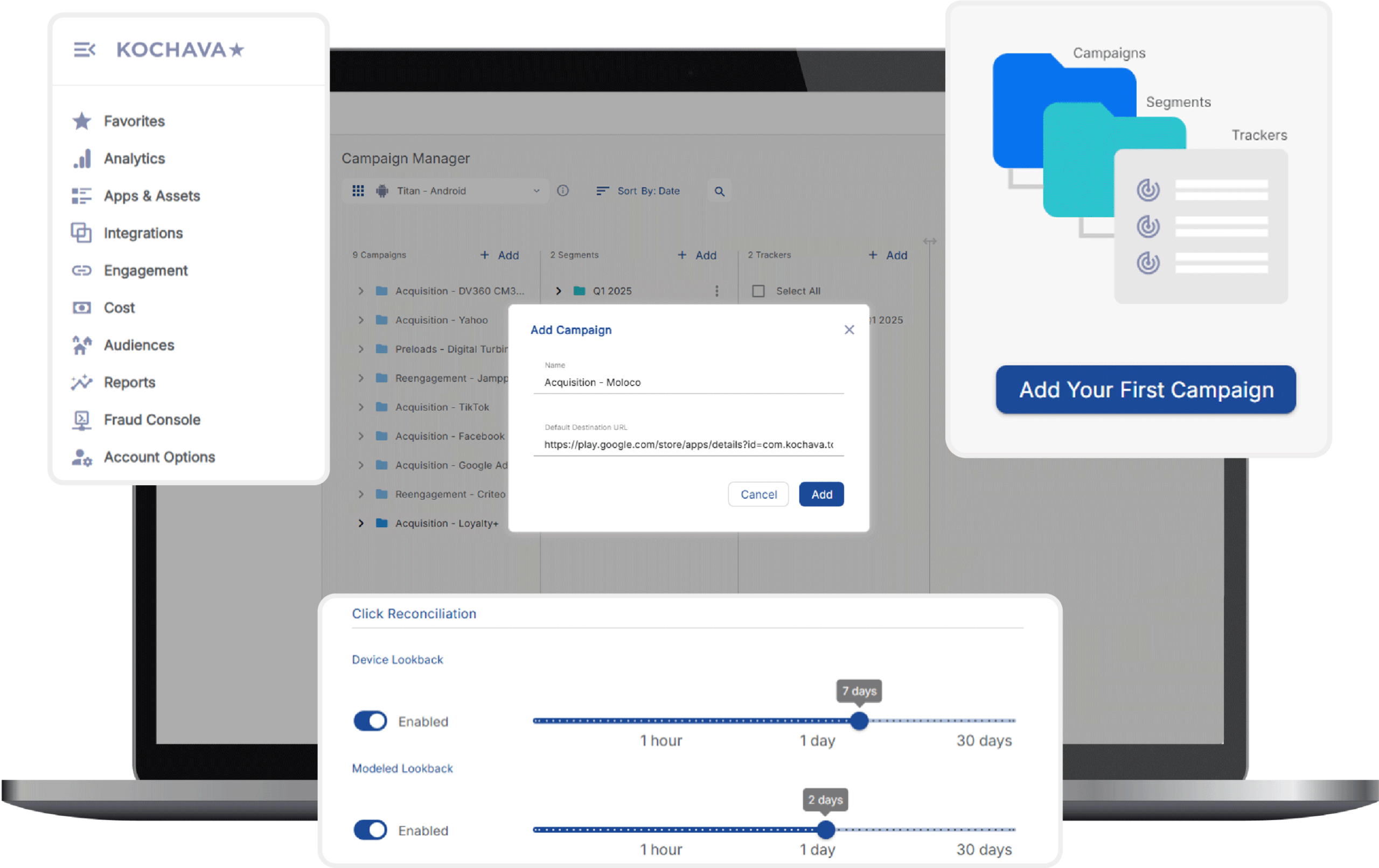
You connect your existing media partners (Google Ads, Meta, TikTok, Apple Ads, Snap, and others) by setting up trackers, configuring postbacks, and testing attribution where applicable. Don’t forget owned media: Kochava SmartLinks™ let you measure email, SMS, QR codes, and web banners alongside your paid campaigns.
Step 5: Analytics, Reporting & Data
The Kochava analytics and reporting dashboards are ready to use the moment you go live—no engineering required. Explore analytics, run reports, and query your raw data directly in-platform with Kochava Query. If you’re part of a larger-scale organization that needs to pipe data into its own data lake or BI tool, ask about our extract, transform & load (ETL) support via reporting APIs and real-time postbacks to your endpoints.
Step 6: Controlled Go-Live
You swap your SDK config to your production app profile, import historical device IDs so Kochava recognizes your existing users from day one, and submit your updated app to the relevant stores. Once your app is approved and live in the store, you can confirm that live data is flowing, activate your media partner integrations, and reenable any paused campaigns. Your onboarding manager does a post-launch check-in to make sure everything’s running as expected.
📖 Want to explore MMP migration steps in comprehensive detail?
This post covers the highlights. For a complete step-by-step breakdown, including documentation links, app profile templates, and support resources,
visit the Kochava MMP Migration Guide.
You’re Not Switching Alone—And This Is Just the Beginning
At Kochava, we’ve guided organizations of all shapes and sizes through MMP migrations over the years, continuously refining the process to make it as smooth as possible. Check out our related G2 Badge for Fastest Implementation. For absolute peace of mind, your dedicated Client Onboarding Manager is with you from kickoff to go-live—and beyond.
Unifying MMP Last-Touch Attribution With Next-Gen MMM + Incrementality Testing
Here’s something worth considering as you ponder any MMP swap.
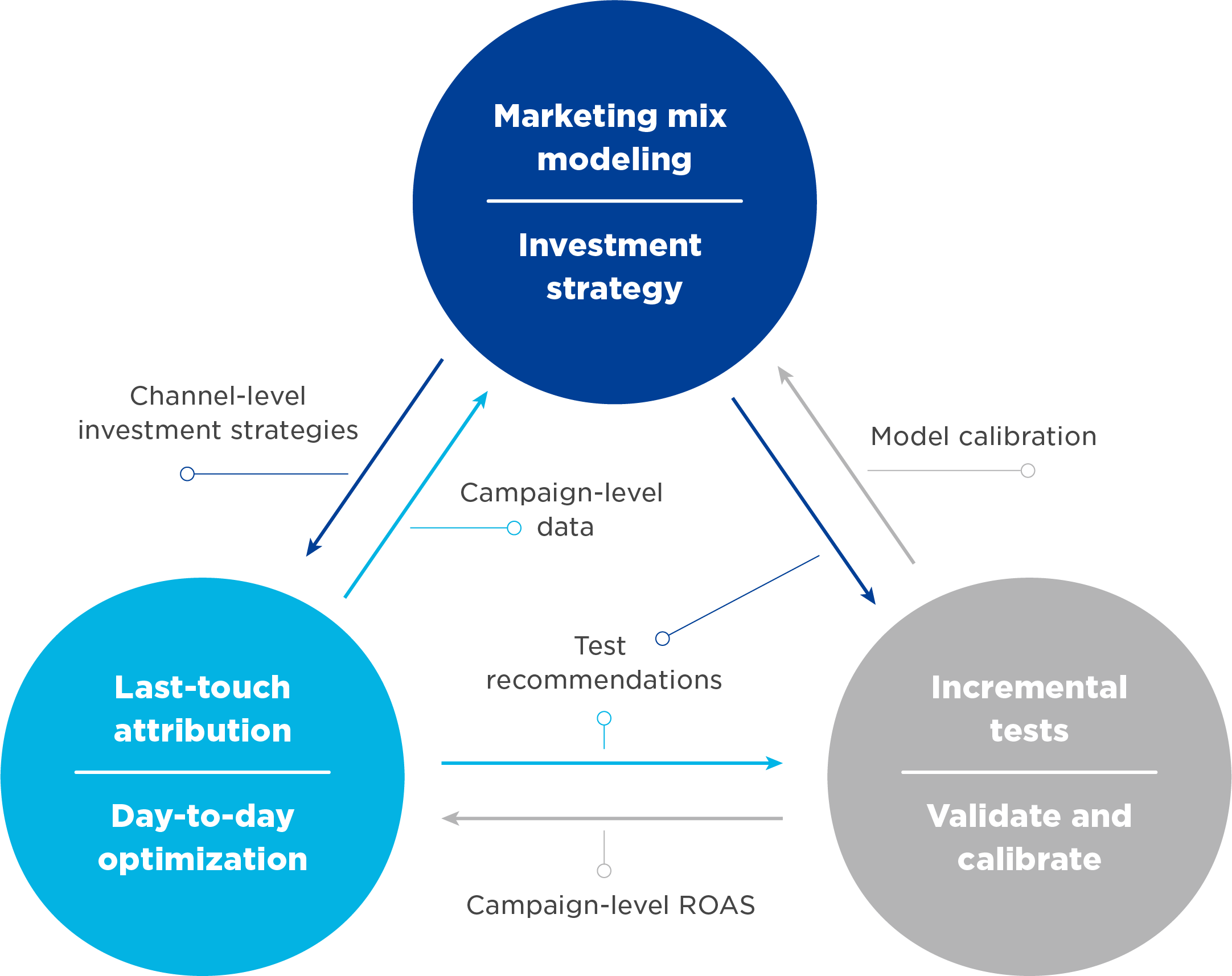
Kochava is the only MMP that unifies traditional last-touch and multi-touch attribution with next-generation marketing mix modeling (MMM) and self-serve incrementality testing—all in a single platform. As ad signal loss continues and marketing channels keep proliferating, relying solely on touch attribution leaves app marketers with an increasingly incomplete picture. MMM and incrementality testing provide the complementary layers needed to triangulate the ultimate ground truth for your marketing performance—across every channel, including those where individual-level signals are limited or unavailable.
The Modern Marketer’s Measurement Framework
You don’t have to tackle the entire framework on day one. Start with MMP implementation. Get your attribution foundation right. Then, when you’re ready, the building blocks for MMM and incremental testing are already there—native to the same platform, supported by the same team.
Read our blog post Attribution Fix: How App Marketers Can Find Real Signal in the Noise for a practical breakdown of how high-performing teams combine last-touch attribution, MMM, and incrementality testing to build a future-proof measurement framework.
Kick Off Your Own MMP Migration
If you’re thinking about making the switch, it’s probably for a good reason. Request a demo to get an up-close, personalized tour of the Kochava MMP platform and a look at how StationOne can accelerate your migration efforts.
Visit the complete Kochava MMP Migration Guide and contact onboarding@kochava.com if you have any specific questions about how migration will work for your app portfolio.
MMP Migration FAQ
Will migrating to a new MMP disrupt our active campaigns?
Not if planned properly. The key is a controlled cutover. You’ll temporarily pause paid UA campaigns during the app store review window (typically 24 to 48 hours) to prevent duplicate attribution between your old MMP and Kochava. Before you go live, you’ll import a list of historical device IDs so existing users aren’t counted as new install conversions. Most organizations run both MMPs in a brief parallel window to confirm data accuracy before fully switching over. Your Client Onboarding Manager will walk you through exactly when to pause and when to reenable.
How long does migration actually take?
Most migrations are complete in 7 to 10 business days. The variables affecting timing are integration depth, number of app profiles in scope, and dependencies including developer availability and app store review times. For context, a basic SDK integration (installs only) takes a developer less than 10 minutes. Adding event tracking and advanced features such as deep linking or consent management can take up to an hour or more. Typically, the bigger time factors are scheduling your dev team and waiting for app store approvals, not the Kochava work itself.
What internal resources do we need to pull off a migration?
Plan to coordinate across three teams: developers (for SDK integration and event instrumentation), marketing/UA managers (for campaign coordination, link replacement, and postback configuration), and if applicable, your analytics or BI team (for ETL setup and data export configuration). You don’t need all three at the same time, and Kochava’s Client Onboarding Managers support your developers directly throughout integration. If you’re a smaller team wearing multiple hats, we help organizations like yours too.
Will we lose our historical attribution data when we switch?
No. Before you go live with Kochava, you’ll export historical install and device IDs from your current MMP and import them into Kochava. This ensures that Kochava recognizes your existing users from day one and doesn’t count them as new installs/users.
We have a large app portfolio and complex existing setup. Is a full MMP migration even realistic?
Yes—and you’re exactly who our enterprise onboarding support is built for. Large-scale migrations require more planning, stakeholder coordination, and change management, but they’re something we do regularly. The first step is a conversation. Contact our team and let us assess your scope together before you commit to a timeline. We’ll help you prioritize which apps and integrations go first, identify the dependencies that could cause delays, and build a phased migration plan that keeps your campaigns running throughout.