Accelerate your growth with your own Kochava AI assistant
TL;DR Summary (click to expand)
The Kochava Workspace, available free to Kochava customers inside StationOne, is a purpose-built AI environment that directly connects to your Kochava account via the Kochava MMP Connector, a native MCP (Model Context Protocol) integration. The workspace provides secure, authenticated access to your apps and first-party data within your Kochava account. Leverage AI to create campaigns and trackers, configure partners, and manage your app marketing through natural language. Explore a library of purpose-built AI skills for attribution analysis, campaign performance insights, budget optimization, and retention. You can even build reusable agents that automate recurring workflows your team runs every week.
Whether you want to accelerate a single reporting workflow or build a fully agentic marketing operations layer atop your first-party data in Kochava, the workspace will help you accelerate agentic adoption.
AI is continually changing the way marketers work. You might have experimented with it, perhaps to draft a quarterly performance recap, quickly summarize a data export, or kick-start a campaign brief. However, if you’re like most marketers, there’s a real gap between knowing you should be using AI more systematically and actually having it embedded in how you or your team operates day to day.
That gap is actually quite stark. According to eMarketer, only 6% of marketers have fully implemented AI in their workflows, and that’s despite 80% feeling urgency to adopt it with the majority of pressure coming directly from the C-suite and board. To be clear, the key bottleneck isn’t motivation. It’s data access and organizational support. Most marketers lack control over their own data strategy, and struggle to get real-time support from their data teams.
We built the Kochava Workspace inside StationOne specifically to close that gap.
Meet the Kochava Workspace
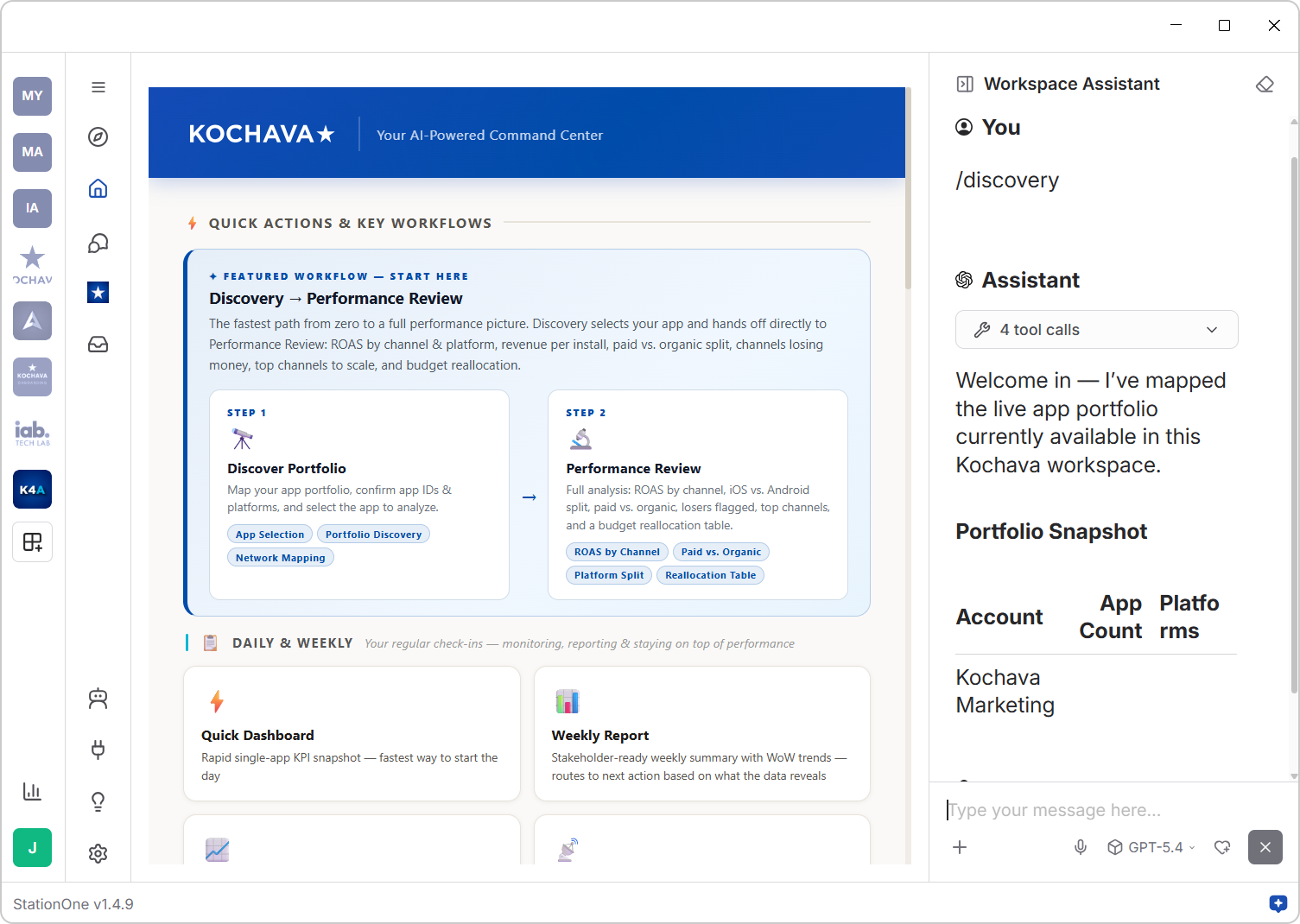
The Kochava Workspace is an AI-powered operating environment, purpose-built around the ecosystem of Kochava solutions for advertisers. Rather than a generic chatbot or third-party AI client, the workspace provides a curated, governed sandbox that combines live connectivity to your Kochava account with tailored AI skills for workflows you run every day (e.g., attribution reporting, campaign management, partner configuration, budget optimization, retention analysis, fraud monitoring).
It’s the difference between asking a general-purpose AI model, “How are my CTV campaigns performing?” and working inside an environment that already knows your apps, your network partners, your events, and your measurement data.
AI Workspace Use Cases
The workspace includes a library of AI skills custom-built by Kochava for our customers, each designed for a specific corner of the app marketer’s workflow. Here are a few ways marketers are putting them to use:
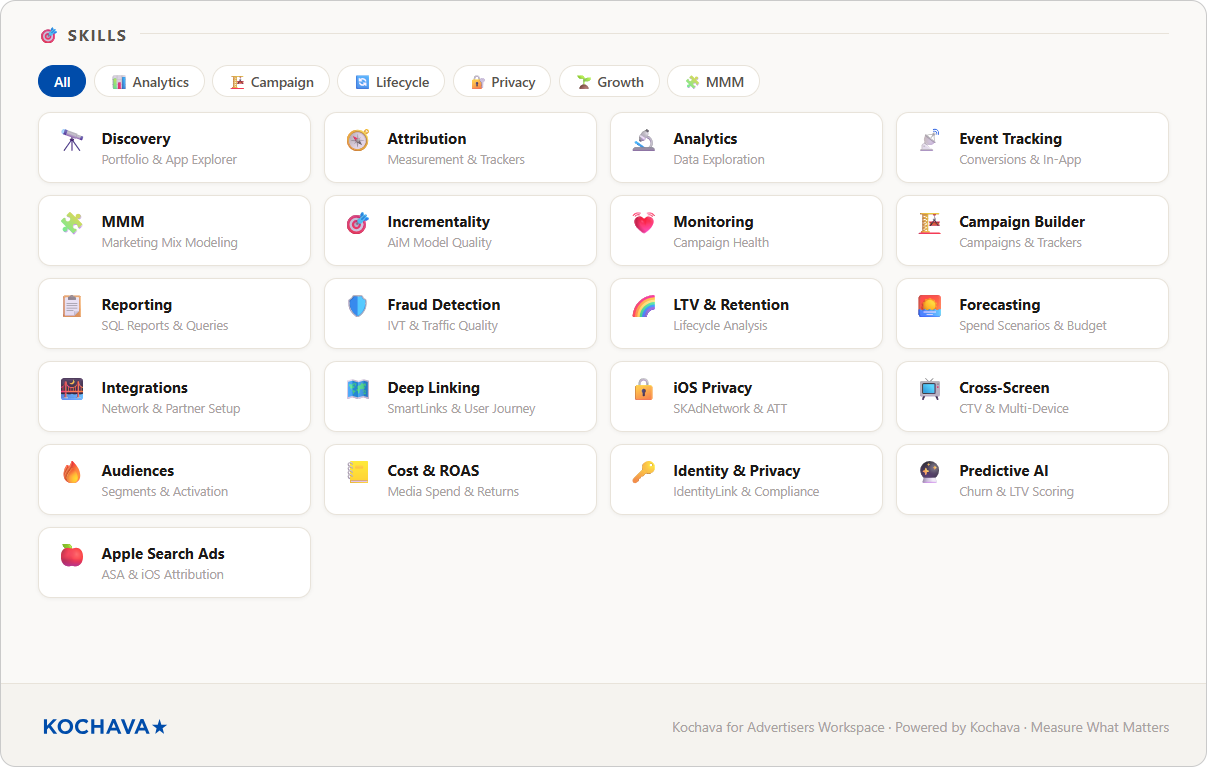
- Weekly performance reviews: Instead of pulling exports and manually summarizing channel performance for a stakeholder deck, a UA lead can run /weekly-report and get a structured, recommendation-led summary of installs, ROAS, CPAs, and top movers, ready to share or refine.
- Attribution audits: A measurement analyst trying to diagnose why iOS install volume looks off can use /attribution to audit attribution setup, check tracker coverage, review window configurations, and surface gaps, in a fraction of the time it would take to dig through the dashboard manually.
- Budget reallocation: A growth marketer staring at a mid-month CPA spike can use /cost-roas or /budget-optimizer to analyze cost efficiency across networks, identify which channels are underperforming on ROAS, and get a prioritized recommendation on where to shift spend before the billing cycle closes.
- Retention analysis: A lifecycle marketer can use /ltv-retention to inspect cohort retention curves, identify churn-prone segments by acquisition source, and start building the audience brief for a win-back campaign, without ever leaving the workspace.
- CTV and cross-screen measurement: For teams running CTV or omnichannel campaigns, /spectrum extends analysis into cross-screen attribution, so you can see how CTV impressions connect to downstream mobile conversions and bring that story forward in client reporting.
These aren’t hypothetical use cases. They’re the workflows that mobile marketing teams run every week, and the workspace makes each of them faster, more consistent, and more actionable.
Contact your Client Success Manager or request a huddle to see these in action.
Build Agents for the Workflows You Run Every Week
Skills are great for on-demand analysis. But some of the highest-value work in marketing operations isn’t spontaneous: it’s predictable. Weekly performance reports. Monday morning campaign health checks. End-of-quarter recaps.
That’s where Agents come in.
Inside the Kochava Workspace, you can open the Agent Forge and build custom AI agents configured to run specific, multi-step workflows with consistent, structured outputs. You define the workflow once. The agent handles execution, every time, with the same rigor and format.
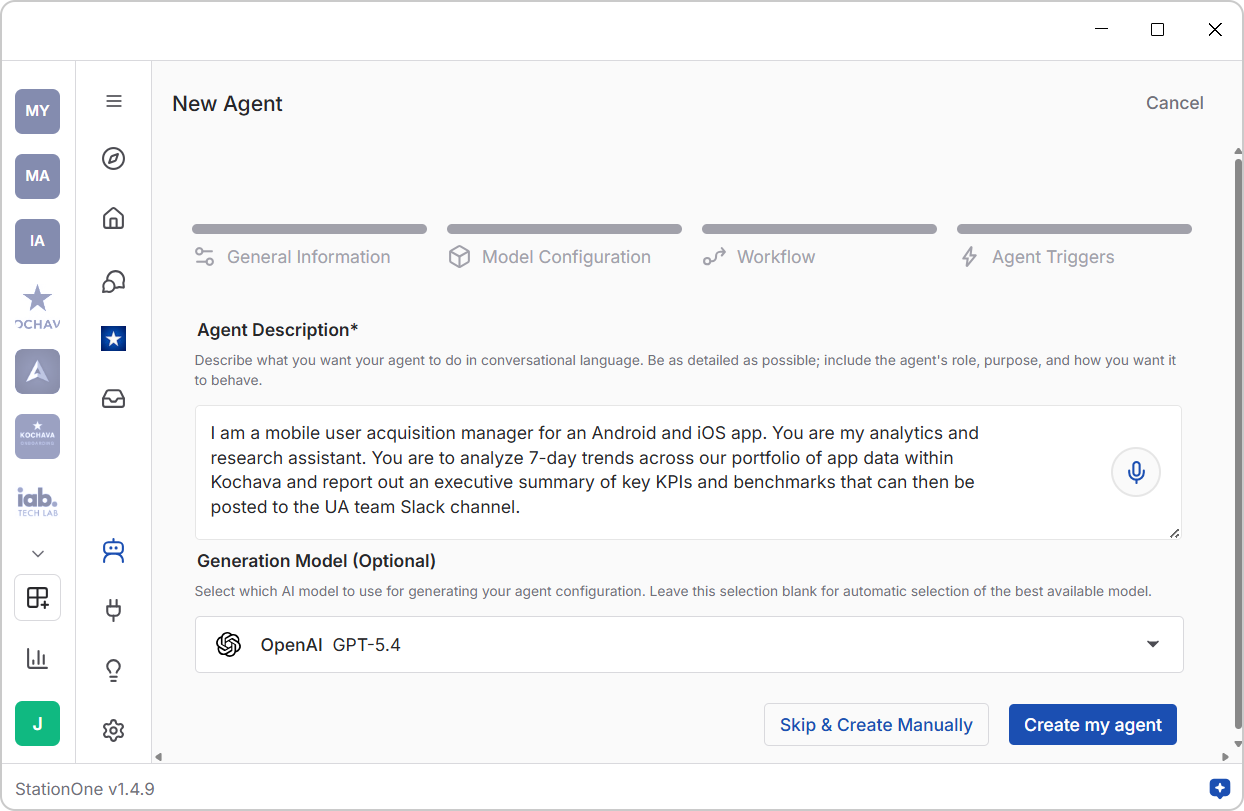
A few examples of what teams are building:
- Weekly campaign digest agent: Every Monday morning, pull installs, ROAS, and CPA by network from the past seven days, flag anything that moved more than 15% week-over-week, and deliver a formatted summary to the team Slack channel.
- Attribution health agent: On a scheduled cadence, audit tracker coverage across active campaigns, check for missing postback configurations, and surface a prioritized list of measurement gaps before they become reporting problems.
- Budget pacing agent: Mid-cycle, compare actual spend against planned pacing by channel, calculate projected over/underspend, and generate a reallocation brief with supporting data ready for the UA lead to review.
The key distinction between an agent and a one-time skill run: agents are built for repeatability. When a workflow has a consistent structure, consistent inputs, and a consistent expected output, it’s a candidate for automation. Agents let you capture that process once and stop rerunning it manually every week.
For teams managing multiple apps, networks, or geographies, this compounds quickly. The volume of recurring analytical work that can be offloaded to agents, while keeping human review at the right checkpoints, is one of the most meaningful productivity shifts the workspace enables.
No technical skills are required to build your own agent. You describe what you want the agent to do and it will build itself—no code required.
An AI Assistant as You Navigate Kochava
Within the workspace, you can also access your live Kochava dashboard.
What makes this different from simply logging into console.kochava.com through your web browser is what’s sitting alongside it. While you navigate your analytics dashboard, review campaign reports, inspect event funnels, or dig into cohort data, your AI assistant is available in the same environment, ready to engage at any point in the session. Further, it has all of the foundational context about advertising, how Kochava works, and more to assist you in the right way, with the right understanding. Context is king.
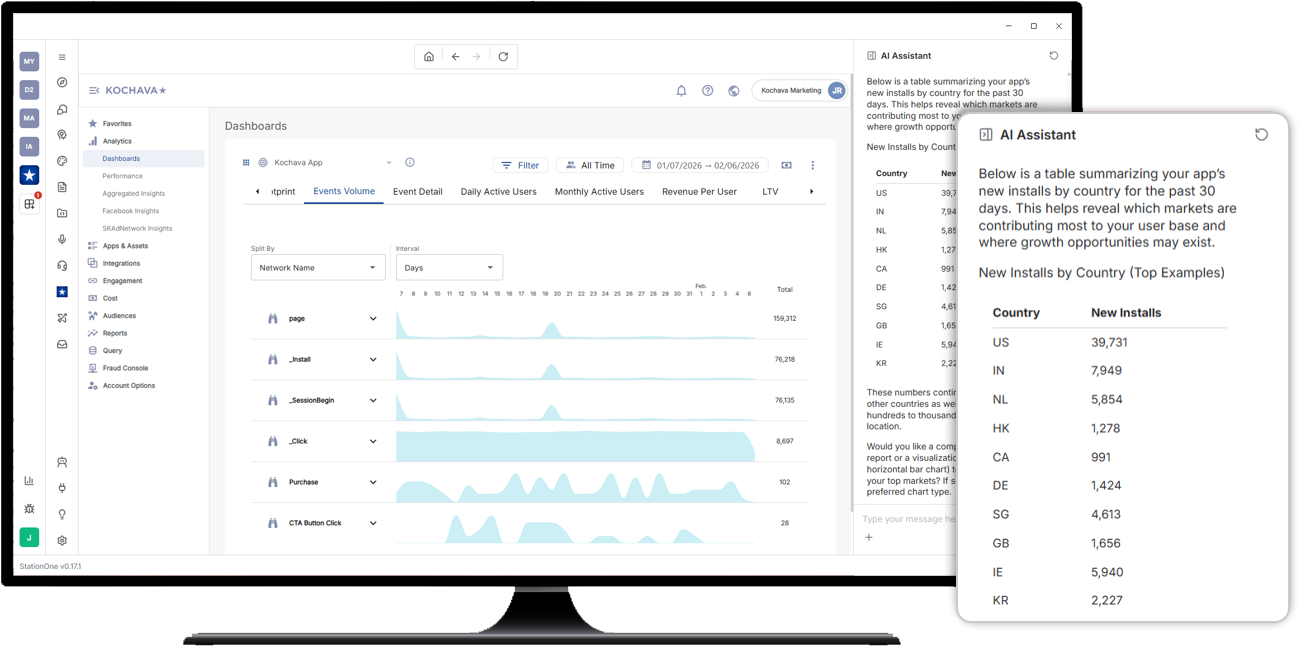
That means you can:
- Ask questions about what you’re seeing: “Why is my D7 retention lower for this cohort than last month’s?” You’ll get a data-informed answer in plain language, grounded in your actual measurement configuration and data.
- Request a best-practice check in real time: “How does this attribution configuration effect conversion reporting for my app campaigns?”
- Get contextual guidance as you work: If you’re setting up a new tracker, configuring an event postback, or reviewing a fraud summary, the AI assistant can walk you through it with the context of your actual account and the linked Knowledge Base of all Kochava support documentation.
- Summarize and export insights: Pull a quick narrative summary of what the data on screen is telling you, formatted and ready for a stakeholder review.
 To log into your Kochava account through the StationOne workspace, select the Kochava icon in the left-hand facet sidebar.
Incorporating Your Full Martech Stack via MCP Connectors
Once you’re working inside StationOne with your Kochava account connected, you also have access to the MCP Connectors Gallery, a growing marketplace of integrations that lets you connect to the other tools, platforms, and systems across your marketing stack.
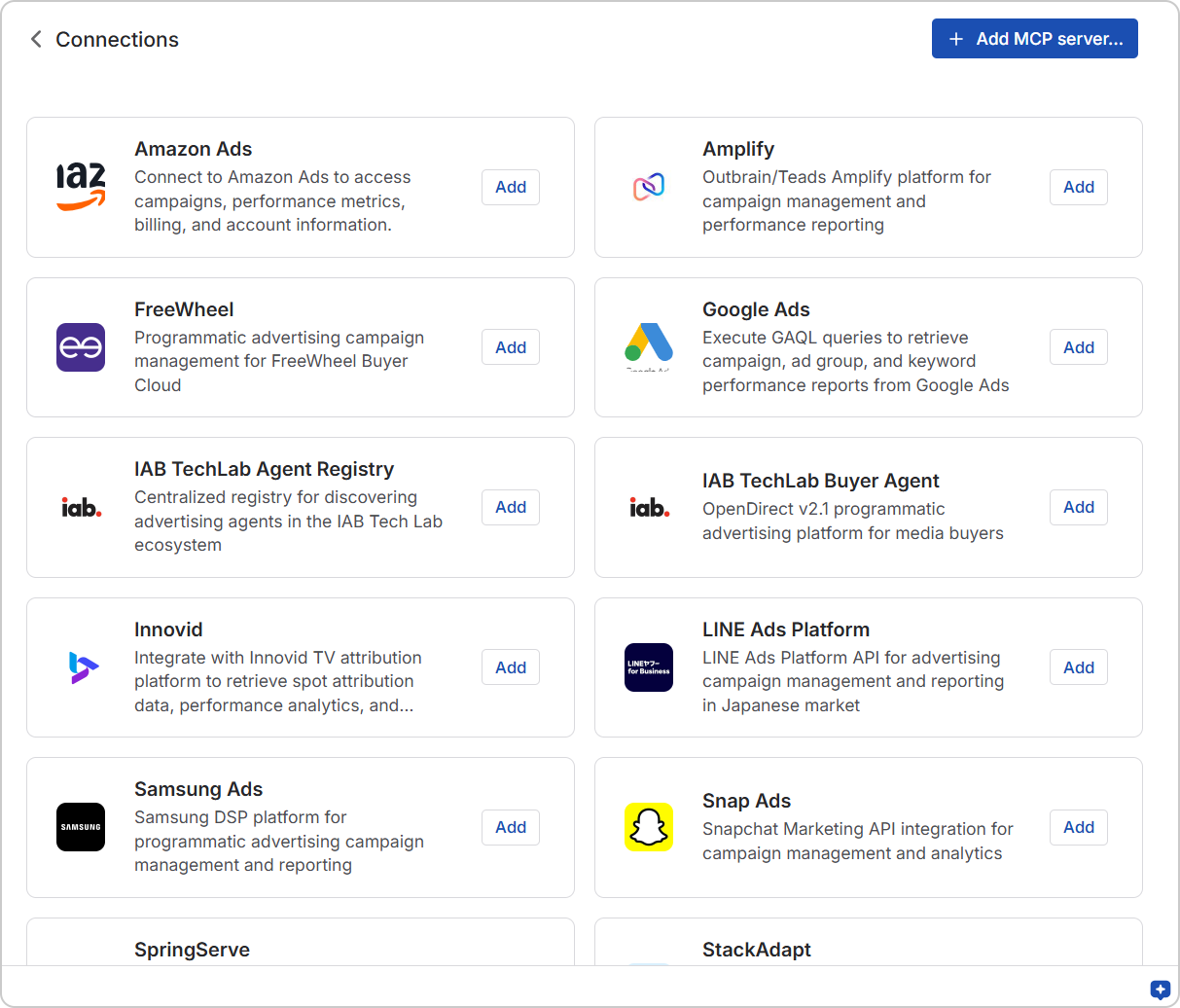 Key MCP Connectors:
- Ad platforms: Connect to Google, Meta, TikTok, Apple Ads, or your DSP of choice. Pull performance data from multiple platforms into the same conversation as your Kochava attribution data. Ask cross-platform questions that today require stitching together three different exports.
- CRM and lifecycle tools: Connect to the platforms managing your customer data, audience segments, and messaging workflows. Start bridging the gap between acquisition performance and downstream customer value.
- Analytics and BI tools: Surface deeper context from your internal data systems, not just your MMP, to get a fuller picture of what’s driving growth.
- Campaign execution platforms: In many cases, it’s not just about reading data. It’s about acting on it. Connected to the right platforms, StationOne can do more than surface a budget reallocation recommendation. They can help you execute it: updating bids, pausing ad groups, adjusting budgets, or creating campaign structures directly within connected platforms.
This is where the shift from “AI-assisted reporting” to “AI-powered workflow automation” happens. You’re no longer just asking questions about your data. You’re building agentic workflows that span your entire marketing tech stack, retrieving insights across platforms, and taking action automatically or with human review at the right checkpoints.
Explore the full MCP Connectors Gallery or select the Connectors icon from the secondary, left-hand sidebar in StationOne.
How to Get Started With the Kochava Workspace
1. Download the StationOne App
StationOne is a downloadable application available for Windows, Mac, and Linux.
After install, you’ll create your user account and can follow the onboarding wizard (which will work through some of the steps below) or skip the wizard and complete them later.
NOTE: If your organization has adopted StationOne at an enterprise level, you will likely be able to login with your work email using single sign-on (SSO) authentication.
2. Join the Kochava Workspace
You’ll be prompted to join available Workspaces during onboarding. Find Kochava for Advertisers in the list and select the option to join.
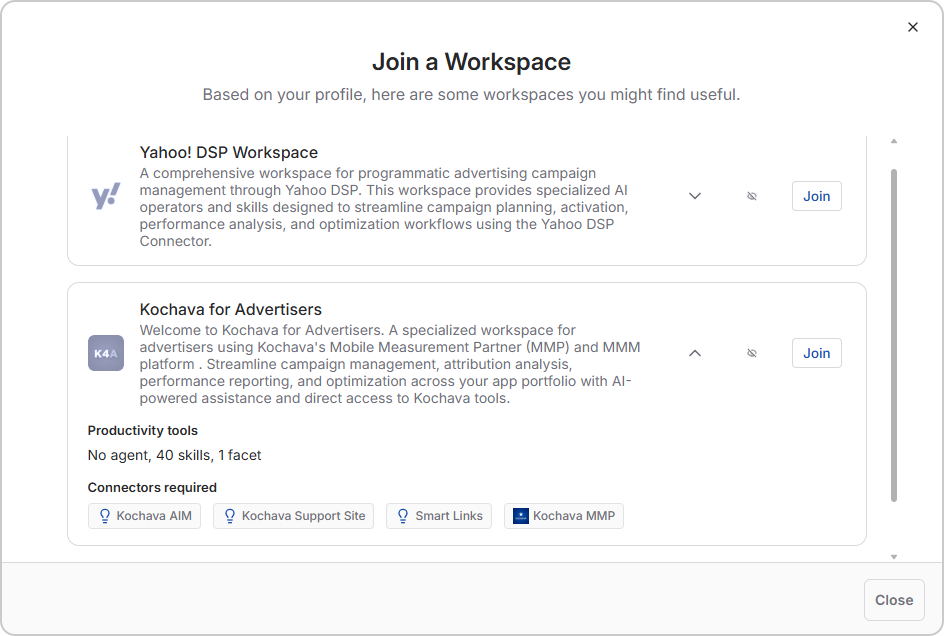
 If you already have StationOne and completed first-time onboarding, you can find available public workspaces anytime by selecting the button at the bottom of the left-hand workspace navigation bar.
3. Connect to Your Kochava MMP Account via MCP
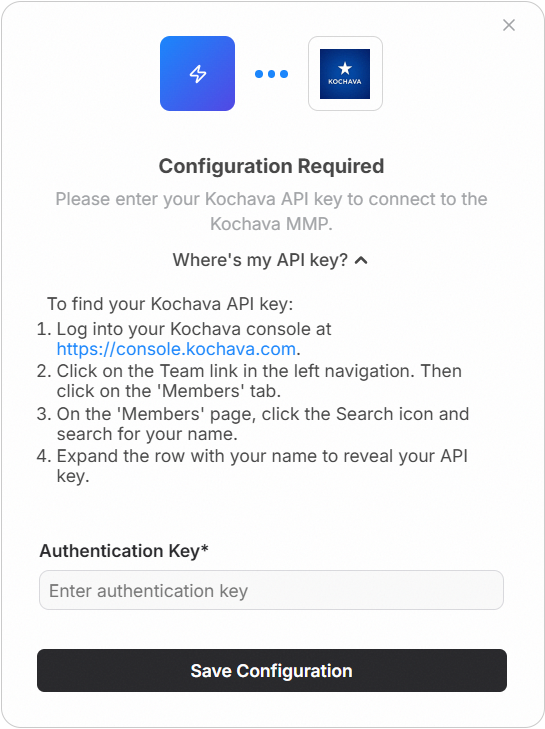
When attempting to join the workspace, you will be prompted to connect your Kochava account. This is accomplished by generating an API key within the Kochava dashboard. Click Where’s my API key? to expand step-by-step instructions to follow after login to console.kochava.com.
If you have any issues finding or creating an API key, contact your Client Success Manager or email support@kochava.com.
To explore the workspace without immediately connecting your Kochava account, you can skip this step and select Join Anyway.
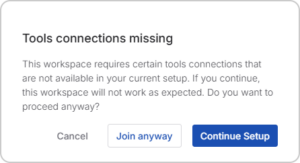
You can add your Kochava account at a later time by selecting the Connector icon in the left-hand sidebar, finding the Kochava MMP connector, and selecting Add.

View Kochava MMP Connector Profile
What is MCP means and why it matters
MCP stands for Model Context Protocol, an open standard that allows AI models to connect directly to external tools and data systems through a secure, structured interface. In plain terms: MCP is what makes it possible for a large language model to reach into a live platform, retrieve real data, and take meaningful action.
The Kochava MMP Connector gives the AI model in your workspace direct, authenticated access to Kochava’s APIs. That covers the full surface area of your account: reporting, attribution data, tracker management, partner configurations, campaign structures, audience segments, app settings, and more.
Critically, this connector isn’t read-only. It’s not just about pulling data into a conversation. It also allows you to take action inside your Kochava account through natural language. You can ask the AI to create a tracker, build a new campaign, configure a partner integration, set up a segment, or add an app, and it executes those changes directly through the Kochava API, with the context of your account already in scope. This opens up an entirely new way of working with your MMP: instead of navigating menus and filling out forms, you describe what you need and AI handles the execution.
This connection is secure and OAuth-authenticated, giving the workspace access to your apps, campaign data, event data, network performance, and measurement configuration. That live context lets your AI copilot give you answers grounded in your data, not generic benchmarks.
3. Connect an AI Model Provider
In order to power the workspace’s AI capabilities, you’ll need to connect an approved large language model (LLM) provider. StationOne supports the leading model providers (including OpenAI, Anthropic, Google Gemini, and others) so you can bring in whichever model fits your team’s needs.
Before you connect: Check with your internal IT or AI governance team regarding which model providers are approved for use in your organization. Many enterprises have specific policies around data handling, model selection, and API key management. It’s worth confirming before you plug anything in.
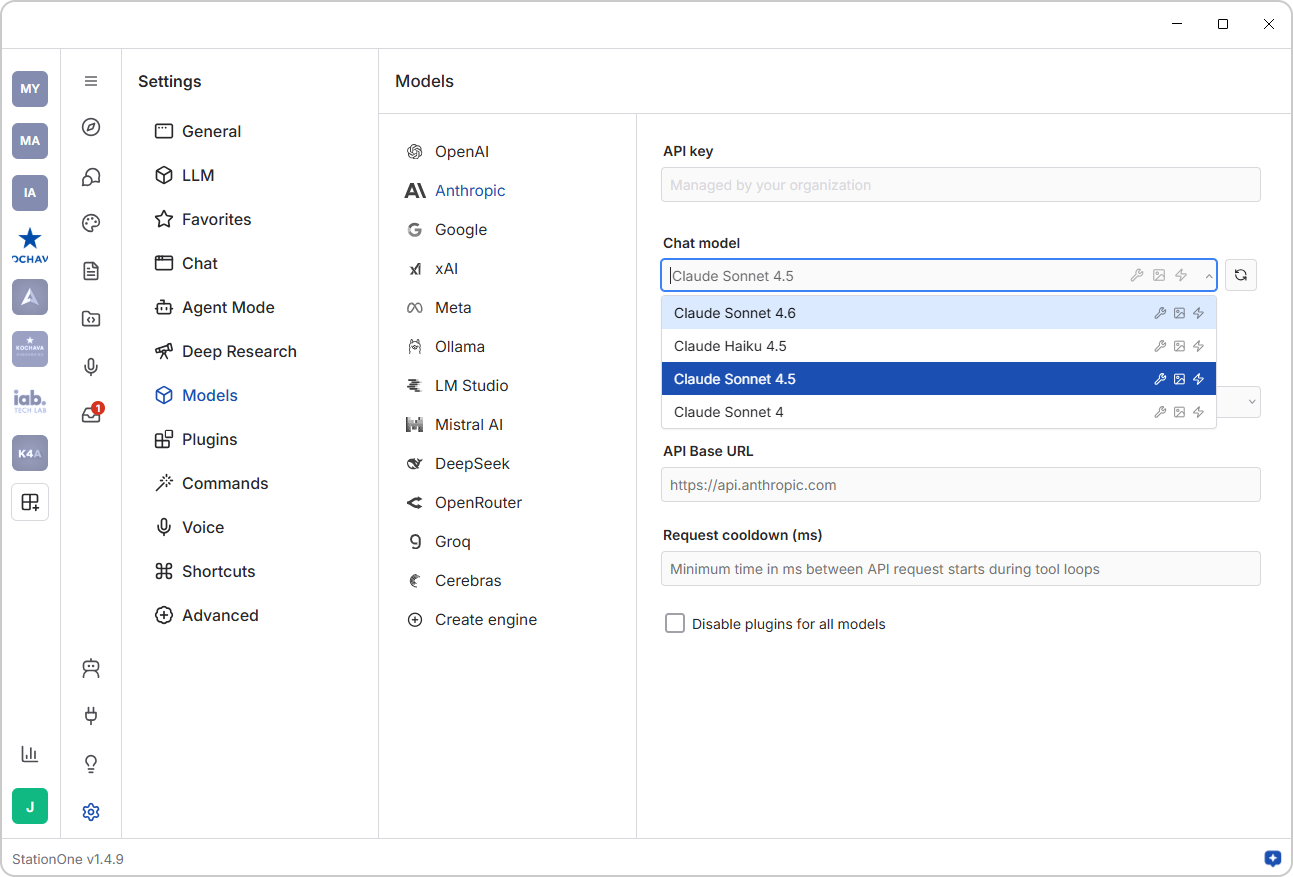
If you didn’t connect an AI model during the initial onboarding wizard, here are the steps to take:
- Open the StationOne app.
- Click the Settings icon at the bottom of the secondary, left-hand sidebar.
- Select Models from the Settings menu.
- Choose your preferred model provider.
- Enter your API key in the provided field.
Note: If your organization manages available models centrally (for example, on a StationOne Enterprise account), the API key field will be locked with a note “Managed by your organization”. Your IT or operations team has already handled the configuration, so you can skip this step entirely and get straight to work.
Ready to Build? We Can Help
We’re genuinely excited to see what you build on top of this workspace. If you want a quick tour before you get started, request a huddle with us and we’ll help you map out your agentic strategy.
If you’re working on a larger-scale AI initiative or have a complex, enterprise-grade agentic AI use case we have a Forward Deployed Engineering (FDE) Team that can assist you. Contact Foundry@Kochava.com for more information and a discovery call.
Not yet a Kochava customer? If you’re not currently using Kochava for measurement but want to understand what it looks like to bring agentic AI fully into your app marketing workflows, from live attribution data to conversational campaign management, we’d love to show you what’s possible. Request a demo.
Subscribe to our newsletter for ongoing content about agentic AI and advertising.
Kochava AI Workspace FAQ
What is the Kochava Workspace in StationOne, and how does it work?
The Kochava Workspace is a purpose-built AI environment inside StationOne that connects directly to your Kochava MMP account. Once authenticated, it gives you access to AI-powered skills, a live dashboard view with an AI assistant, and the ability to build agents, all operating on your actual campaign data, attribution events, and measurement configuration. It’s not a standalone product. It’s an AI layer built on top of the Kochava data you’re already working with.
Is the Kochava Workspace free?
Yes. The workspace is available at no additional cost to Kochava customers. You’ll need a Kochava account, a StationOne installation, and a connected LLM provider (such as OpenAI or Anthropic) to power the AI capabilities. The workspace itself, including the skills library, dashboard facet, and agent-building capabilities, is included as part of the Kochava product experience.
What can AI agents actually automate inside the Kochava workspace?
AI agents in the workspace are designed for recurring, structured workflows: the tasks your team runs on a predictable cadence with consistent inputs and expected outputs. Common examples include weekly campaign performance digests, attribution health audits, budget pacing summaries, and cohort retention reviews. You configure the workflow once; the agent handles execution reliably, every time. For workflows that connect to other platforms via the MCP Connectors Gallery, agents can also take action, not just surface insights.
How is the Kochava workspace different from using a general AI tool like ChatGPT for marketing analysis?
This is one of the most important distinctions to understand, and it goes deeper than just “your data is connected.”
When you export a report from Kochava and paste it into a general AI tool, you’re bringing a slice of data into an environment that has no understanding of how that data was produced. It doesn’t know your attribution windows, your event taxonomy, your partner configurations, or the measurement methodology behind the numbers. It can describe what’s in front of it, but it can’t reason about why, and it has no guardrails to stop it from drawing conclusions that don’t hold up in the context of how mobile and CTV attribution actually works.
The Kochava Workspace is different at the foundation. The data you’re working with inside the workspace is sourced directly from Kochava’s governed, structured APIs, not copied-and-pasted exports that lose context the moment they leave the platform. The Kochava MMP Connector means the AI has secure, authenticated access to your account, with the full relational context intact: which events map to which apps, how trackers are configured, which partners are active, what your attribution logic is.
On top of that, the workspace is built with curated contextual intelligence specific to app marketing and ad tech. The AI skills, the connector setup, and the workspace configuration all carry domain knowledge that a general AI tool simply doesn’t have. When you ask a question about SKAN campaign performance or cohort-level LTV, the workspace understands the terminology, the measurement frameworks, and the operational context in ways that matter for the quality of the answer you get back.
What AI models does the Kochava Workspace support?
The workspace runs inside StationOne, which supports all major LLM providers including OpenAI (GPT-4o, o1, etc.), Anthropic (Claude, Sonnet), Google (Gemini), and others. You connect your preferred model provider through StationOne’s Settings panel using your organization’s API key. If your organization is on a StationOne Enterprise plan, model access may be managed centrally by your IT or operations team, in which case no configuration is needed at an individual user level.
For additional FAQ about StationOne, visit: https://stationone.ai/faq/