
Kochava releases CTV impression equalizer to elevate attribution priority for cross-platform outcomes
TL;DR Summary
Traditional mobile attribution models prioritize clicks over impressions, frequently undercrediting non-clickable connected TV (CTV) ad impressions. To solve this, Kochava launched CTV Equal Priority. This enables advertisers to configure attribution settings to prioritize qualifying, recent CTV impressions to compete directly with clicks based on recency. This gives growth marketers the exact dial they need to measure and credit cross-screen conversions accurately.
For help enabling this in your Kochava dashboard, contact your Client Success Manager or email support@kochava.com. Explore the support documentation.
Connected TV (CTV) keeps growing as an advertising channel, bringing immersive storytelling to the biggest screen in the home. To help marketers capture its true impact, Kochava has released new configurable attribution controls to optimize how CTV campaigns are attributed to cross-platform outcomes.
CTV Attribution Challenge
 The fundamental challenge stems from absorbing CTV into an attribution waterfall framework originally engineered for mobile. Traditional measurement frameworks were built around handheld devices, where ad exposure, click, and conversion all take place on the same screen. In this single-device ecosystem, attribution rules logically favored clicks over impressions, establishing a rigid hierarchy where clicks almost universally win.
As an upper-funnel, non-clickable medium viewed from across the room, CTV breaks this paradigm. People don’t tap their television screens for the most part (except for some CTV ads made for interaction via the smart TV remote). Rather, viewer response unfolds cross-device and downstream. At Kochava, we observe such interplay daily: An engaging living room commercial directly inspires a viewer to pick up their phone, search for the brand, or browse the app store.
Picture the moment that matters most: Someone watches your ad on their CTV and shortly afterward installs your app or completes a purchase. Under legacy waterfall mechanics, an incidental click on a mobile ad from 4 days earlier can still snatch full conversion credit—simply because it’s a click, while the TV ad is an impression.
Absorbing the power of CTV requires evolving the waterfall. This is why Kochava created CTV Equal Priority, a CTV impression equalizer control lever that gives growth marketers a precision dial to ensure that their living-room investments receive the credit they deserve.
CTV Impression Equal Priority
CTV Impression Equal Priority is a configurable Kochava attribution setting to enable a recent, qualifying CTV impression or view to compete with clicks on recency priority. This means the touchpoint closest to the conversion earns the credit—even when it’s not a click.
A CTV ad view that just happened shouldn’t automatically lose to a click from days ago.
Here’s how it works in practice:
- True recency decides: When CTV Equal Priority applies, a qualifying CTV view and a click are compared on timing alone, not impression vs. click. Whichever happened more recently wins.
- Fresh clicks still win: If someone clicks an ad 10 minutes before installing, the click still beats a CTV view from 2 hours earlier. This setting makes the comparison fair.
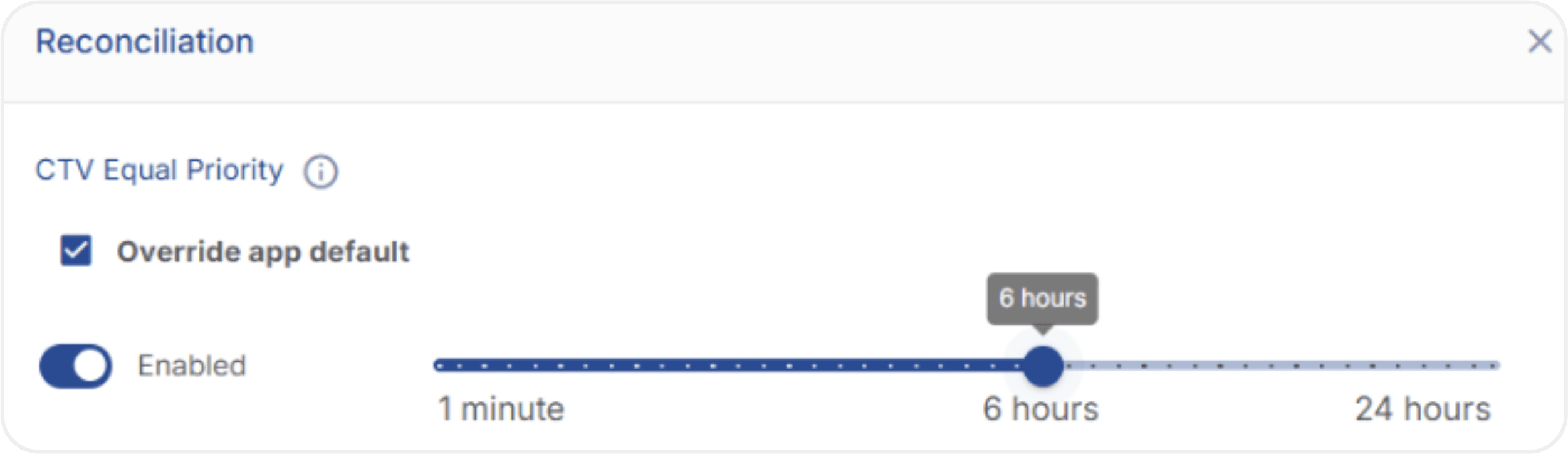
- You choose the window: Marketers decide how recent a CTV view needs to be to qualify, anywhere from 1 minute to 24 hours. Six hours is the starting default.
- Only CTV is affected: The setting applies to impressions tagged as CTV inventory. Your rules for every other channel stay exactly as they are (e.g., clicks prioritized over impressions).
- Match quality still matters: Views qualify when they’re matched by Device ID, modeled attribution, or full IP address. Partial IP matches don’t qualify, keeping the data trustworthy.
Learn more in the dedicated support documentation.
App Store Search Exception for Apple Ads
Coinciding with the launch of CTV Equal Priority, Kochava added additional configurability for marketers with active search ads campaigns running on Apple Ads.
Kochava data shows that when CTV and search appear together in the same multi-touch conversion path, the search engagement is directly preceded by the CTV impression 96% of the time. Think of a viewer watching a brand spot on the big screen, immediately reaching for their phone, searching for the app in the App Store, and seeing and/or tapping a search ad. In such a case, last-touch attribution universally credits the search ad engagement.
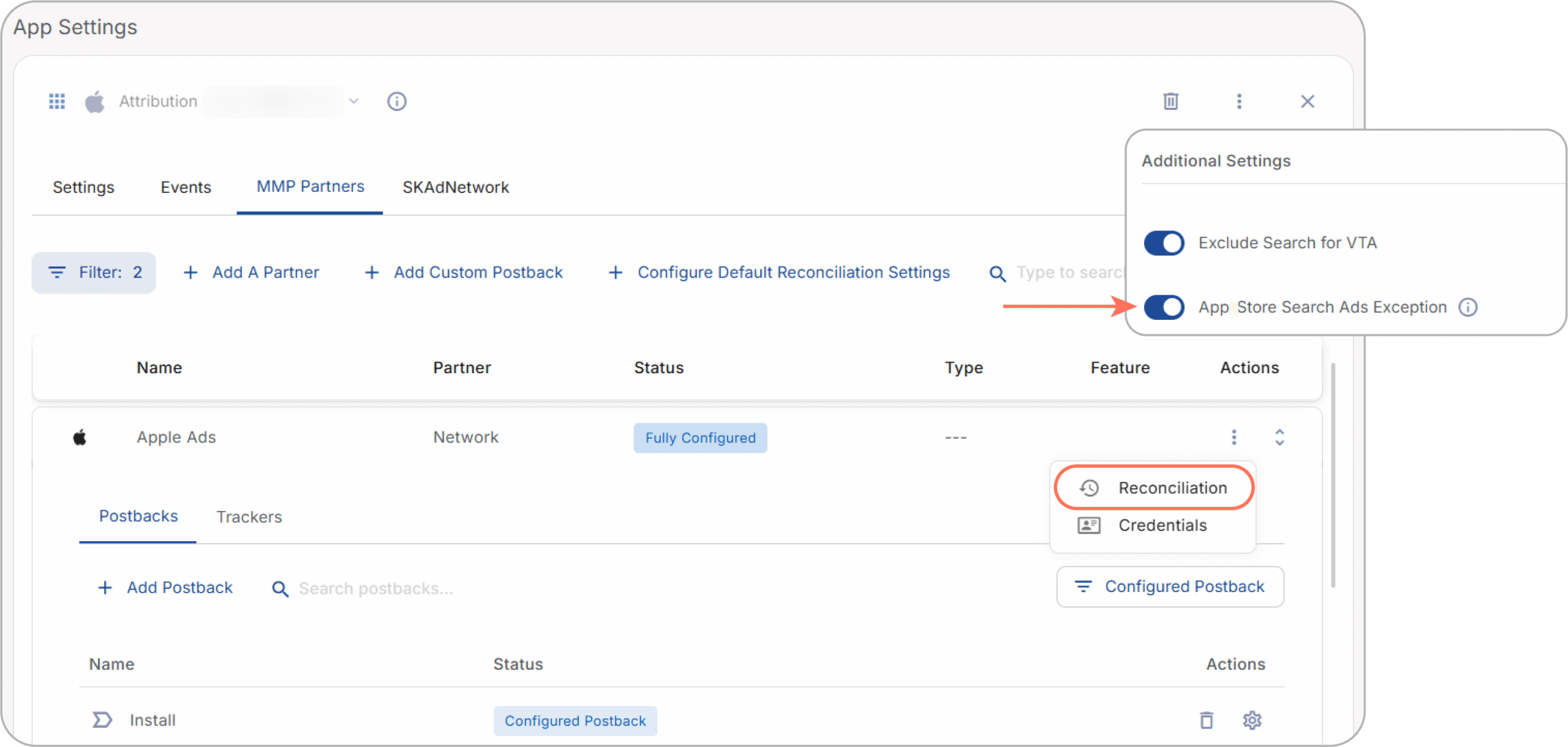
Since data shows that CTV actively catalyzes search behavior, advertisers using Kochava now have a dedicated setting to control how they want conversions attributed in such a scenario. A new App Store Search Ads Exception toggle is enabled by default within the Apple Ads partner configuration for any iOS app. Starting November 11, any Apple Ads App Store search engagement that occurs after a qualifying CTV impression within your defined CTV Equal Priority window is still captured as an influencer in multi-touch attribution data, but the qualifying CTV impression initiating the intent is awarded attribution credit.
App marketers can disable this feature at their discretion. Contact your Client Success Manager or support@kochava.com for more information.
What CTV Equal Priority Looks Like in Real User Journeys
Here are two everyday examples:
Example 1: FinTech App
✖️
Without CTV Equal Priority
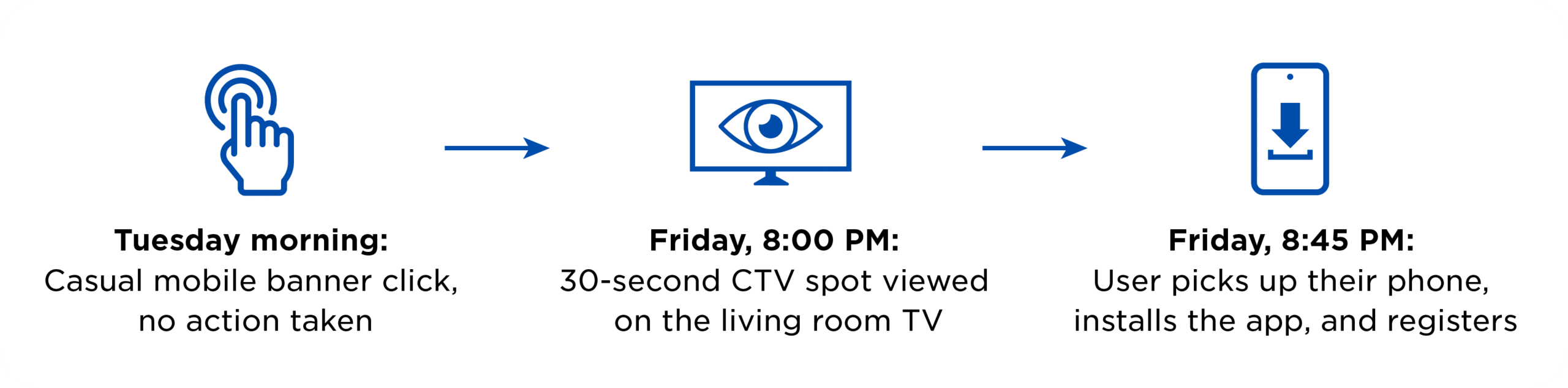
The Tuesday banner click receives the last-touch credit because it was a click. The CTV spot that preceded the install by 45 minutes gets influencer status in multi-touch reporting but not the conversion credit. This can make CTV look like it isn’t performing.
✅
With CTV Equal Priority
The CTV view falls inside your configured window, so it competes with the banner click on recency. The view happened at 8:00 PM and the click was days earlier, so the CTV view earns the credit.
Example 2: Food Delivery
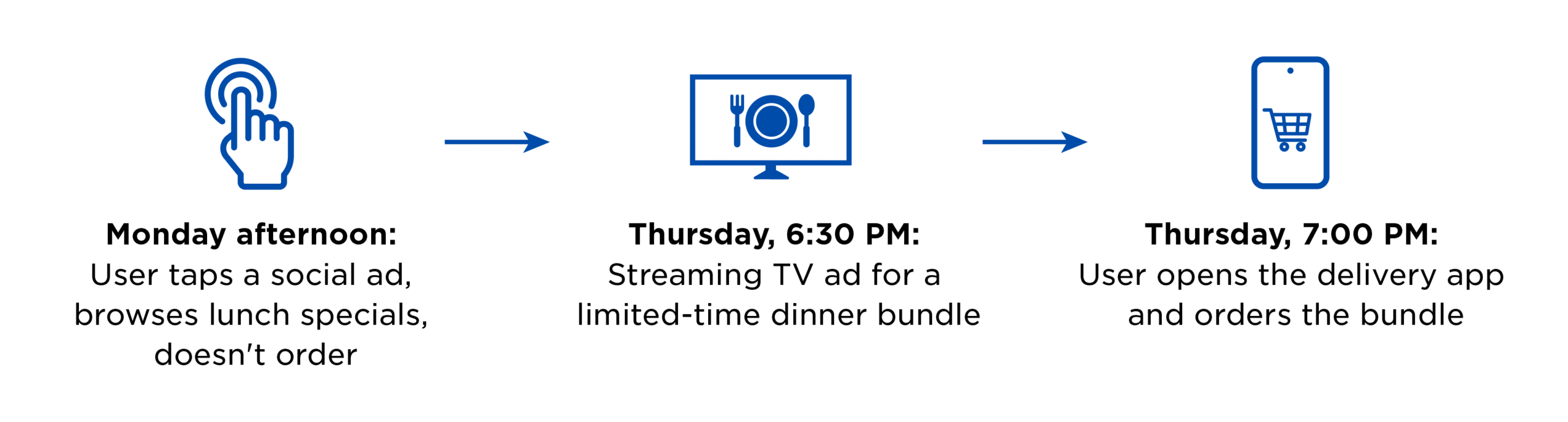
✖️
Without CTV Equal Priority
The Monday social click takes the conversion, and CTV looks like it isn’t driving orders.
✅
With CTV Equal Priority
The dinner-hour CTV spot is compared with the Monday click on recency and recognized for the order. The growth team can see what CTV contributes and make budget decisions with more confidence.
In both cases, the setting doesn’t invent credit. It makes sure the more recent, more relevant touchpoint gets fairly considered.
How to Configure CTV Equal Priority
This setting is yours to control. Kochava is the data processor, and you are the data controller. You decide how much credit CTV should be eligible to earn, and where.
You can set CTV Equal Priority at three levels, and the most specific level wins.
Three Levels of Control
1. App default
Default Reconciliation Settings
A single baseline for your whole app
2. Partner override
Partner Reconciliation Settings
Tailor by ad network, DSP, or streaming publisher
*Toggle App Store Search Ads Exception under Apple Ads Partner Configuration
3. Tracker override
Fine-tune an individual campaign or flight
To get started:
- Make sure your CTV inventory is tagged: Kochava is working with all CTV partners to pass this tag directly. You can also turn on the CTV Inventory option on the tracker or SmartLink as a fallback.
- Choose your window: Six hours is a good starting point. Shorten it if you want a stricter test, or lengthen it if your ad creative tends to drive delayed action.
- Set your levels: Start with the app default, then add partner or tracker overrides where a specific partner or campaign calls for different logic.
- Configure App Store Search Ads Exception toggle based on how you want to handle conversion attribution for users with a CTV ad impression followed by a search ads engagement on Apple Ads.
- Review with your team: Compare CTV’s contribution before and after, and adjust the window as you learn.
Every time CTV Equal Priority changes which touchpoint wins a conversion, Kochava logs it. If you’d like to understand a specific outcome, contact your Client Success Manager or email support@kochava.com.
Updates for CTV Partner Integrations
If you’re an integrated partner that serves ads on CTV inventory, contact our Partner Integrations team at integrations@kochava.com. We’ll work with your team to ensure that your CTV impressions are properly identified and eligible for equal priority attribution.
A Long Commitment to Configurable Choices
Kochava has been a mobile measurement partner since 2011, and configurability has been part of the story from the start. We’ve always empowered advertisers to control the conditions for how credit is assigned across their media mix, because every business, funnel, and channel mix is different.
As CTV becomes an increasingly important part of the mix, we’re excited to extend the same flexibility to the big screen.
Measurement Works Best When the Whole Picture Is in One Place
Trustworthy attribution logic depends on good data underneath it. Kochava integrates with major CTV platforms, publishers, and DSPs that connect to streaming and CTV inventory. That means CTV performance can sit next to your mobile, search, social, and web results in a single platform, rather than in a separate report.
With one view of your full media mix, it’s easier to compare channels fairly and put budget where it’s working.
Contact us to learn more.
We work with who you work with:

Let’s Make Sure Your CTV Gets Its Due
If you’re a Kochava customer:
Review this support documentation before making changes. We’re glad to help you review your configuration, talk through settings, or walk you through a demo.
Reach out to your Client Success Manager or contact support at support@kochava.com.
If you’re running CTV and don’t yet have a measurement partner built for it:
Let’s talk. Request a demo, and together we’ll look at your media mix and show you how to measure the real contribution of your CTV spend.
CTV Impression Equalizer FAQ
What is CTV Impression Equal Priority (CTV Impression Equalizer)?
CTV Impression Equal Priority is a configurable attribution setting in Kochava that enables qualifying connected TV (CTV) ad impressions to compete directly with clicks on recency priority. Instead of automatically subordinating impressions to clicks, the Kochava attribution engine awards conversion credit to whichever qualifying touchpoint occurs closest in time to the conversion event.
Why do legacy attribution models often undercredit CTV ads?
Legacy mobile attribution frameworks were engineered for handheld devices, where ad clicks and app installs occur on the same screen, leading waterfalls to rank clicks above impressions by default. Because CTV is an upper-funnel, non-clickable medium viewed on television screens, viewers often take action later on mobile or web devices. Under legacy rules, an older, incidental mobile ad click from days prior can claim full last-touch credit over a fresh, high-impact CTV view that directly inspired the conversion.
How do advertisers configure CTV Impression Equal Priority in Kochava?
Marketers can configure Equal Priority across three granular account tiers: Default Reconciliation Settings (app-wide baseline), Partner Reconciliation Settings (specific CTV partners, ad networks, or DSPs), or Tracker Overrides (individual campaigns or flights). Advertisers can customize the qualifying recency window anywhere from 1 minute up to 24 hours (with 6 hours as the default) and apply it strictly to verified CTV inventory.